Move From Watching Tutorials
to Writing Real Python.
Codo lives directly inside VS Code. It explains code out loud with an audio-synced Ghost Cursor, checks your understanding verbally, and coaches you through exercises in English and Amharic.
Built Around the Way Beginners Actually Learn.
Passive video tutorials create an illusion of mastery. Codo forces active recall and hands-on coding directly inside your editor.
Live Spoken Guidance
Codo explains code concepts aloud with sub-second response times. Ask questions, interrupt mid-sentence, or request re-explanations naturally.
Audio-Synced Ghost Cursor
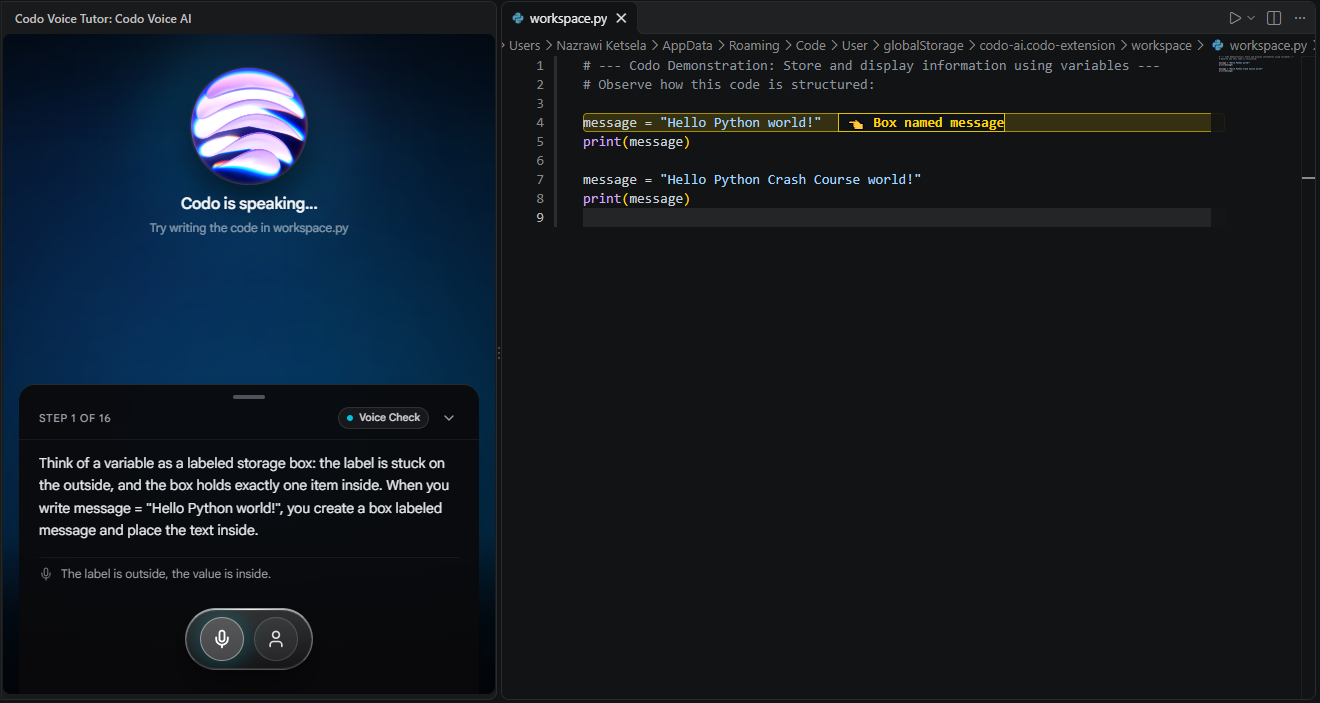
Instead of watching a video in a separate browser tab, the Ghost Cursor moves directly inside your editor, highlighting code in sync with the spoken explanation.
Immediate In-Editor Practice
Write code in workspace.py and press Ctrl+S. Codo evaluates your solution locally and provides instant conversational feedback.
Every Module Starts With a Clear Goal.
Eliminating cognitive friction by turning passive watching into guided, conversational coding.
The Socratic Micro-Loop
14 Micro-Steps Per ConceptExperience Every Step of a Lesson.
Explore authentic captures from the Codo extension demonstrating how voice and editor synchronize seamlessly.
Codo illustrates code line-by-line in workspace.py while speaking out loud, highlighting variables and statements in lockstep with the explanation.